Source code: jstrebeck/Cisco-Vlan-Switch
Disclaimer. This was a high school learning project and nothing more. It talks to the switch over Telnet, which sends credentials and every command in cleartext, and it has an enable password hardcoded in the source. Do not use this approach on any network you care about. I am posting it because it is where I started, not because it is how this should be done.
I built this to answer two questions at once: how do you make a desktop app with a real window and buttons, and how do you get Python to talk to a Cisco switch? The result is a single Python file, a Glade layout, and a tool that moves one switch port between two VLANs with a click.
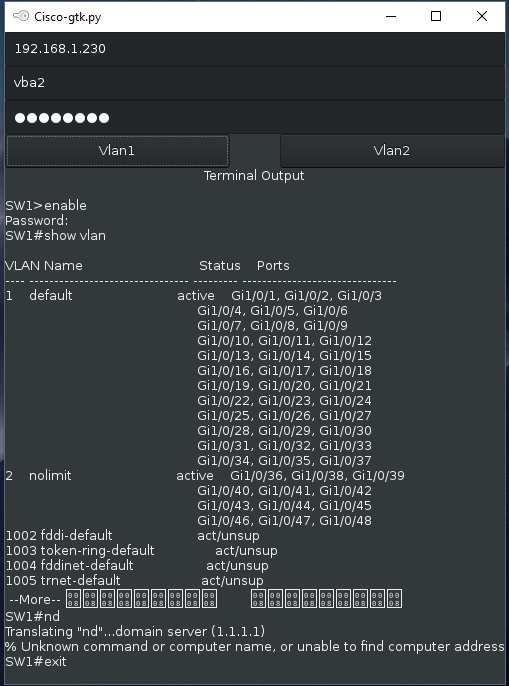
The Frontend
The window is laid out in Glade, GTK’s visual designer, and saved as an XML file. The Python side loads that file with Gtk.Builder, connects a handler class to the signals declared in the layout, and shows the window. That split was the first real lesson: the layout is data, and the code only responds to events. Three text entries collect the switch address, username, and password. The password entry turns off visibility as soon as you type in it. Two buttons trigger the VLAN change, and a label at the bottom displays whatever the switch printed back.
Talking to the Switch
The networking side uses Python’s built-in telnetlib. Each button opens a Telnet session, waits for the username and password prompts, enters enable mode, and then sends the same sequence a person would type at the console: enter configuration mode, select the interface, set the access VLAN, bounce the port with a shutdown and no shutdown, and exit. A second function runs show vlan and dumps the output into the GTK label so I could confirm the change took effect without opening a separate terminal.
It worked. Pressing a button moved a device between two VLANs on a lab switch, and seeing the VLAN table update in the app window was the payoff.
What Was Wrong With It
Looking back with a few years of experience, the list is long, and it is worth spelling out because each item became a real lesson later.
- Telnet is cleartext. The username, password, enable password, and every command crossed the wire unencrypted. SSH with a library like Netmiko or Paramiko is the minimum today, and Cisco gear has supported it for a very long time.
- A hardcoded enable password. The privileged mode password is a string literal in the source. Secrets belong in a credential store or at least an environment variable, never in a file that gets committed.
- A hardcoded port and VLANs. The interface name and the two VLAN IDs are baked into the functions, so the tool only ever worked for one port on one switch.
- No error handling or validation. A wrong host, a bad password, or a slow prompt would hang or crash the app. Nothing checked that the commands actually succeeded.
- Global state everywhere. The host, username, and password are module-level globals mutated by the entry callbacks. It worked for a hundred-line script, but it is the kind of thing that made me appreciate proper state management later.
- Python 2. The file imports both the GTK 3 bindings and the legacy
gtkmodule, and it relied on Python 2 string handling that no longer runs anywhere.
Why It Still Matters to Me
This was the first time I connected a user interface to infrastructure and watched something physical change as a result. It was also the first time I automated a network device instead of typing into it, which is a straight line to the Terraform and Ansible work I do now. The security mistakes are obvious in hindsight, and being able to name every one of them is a decent measure of how far the intervening years went.